
Best Laptop Under $400 for Students in 2026 (3 Picks That Don't Feel Cheap)
By Tech Gear Hub • Last updated: November 8, 2026
As an Amazon Associate I earn from qualifying purchases. Prices change often — always check the current price before you buy.
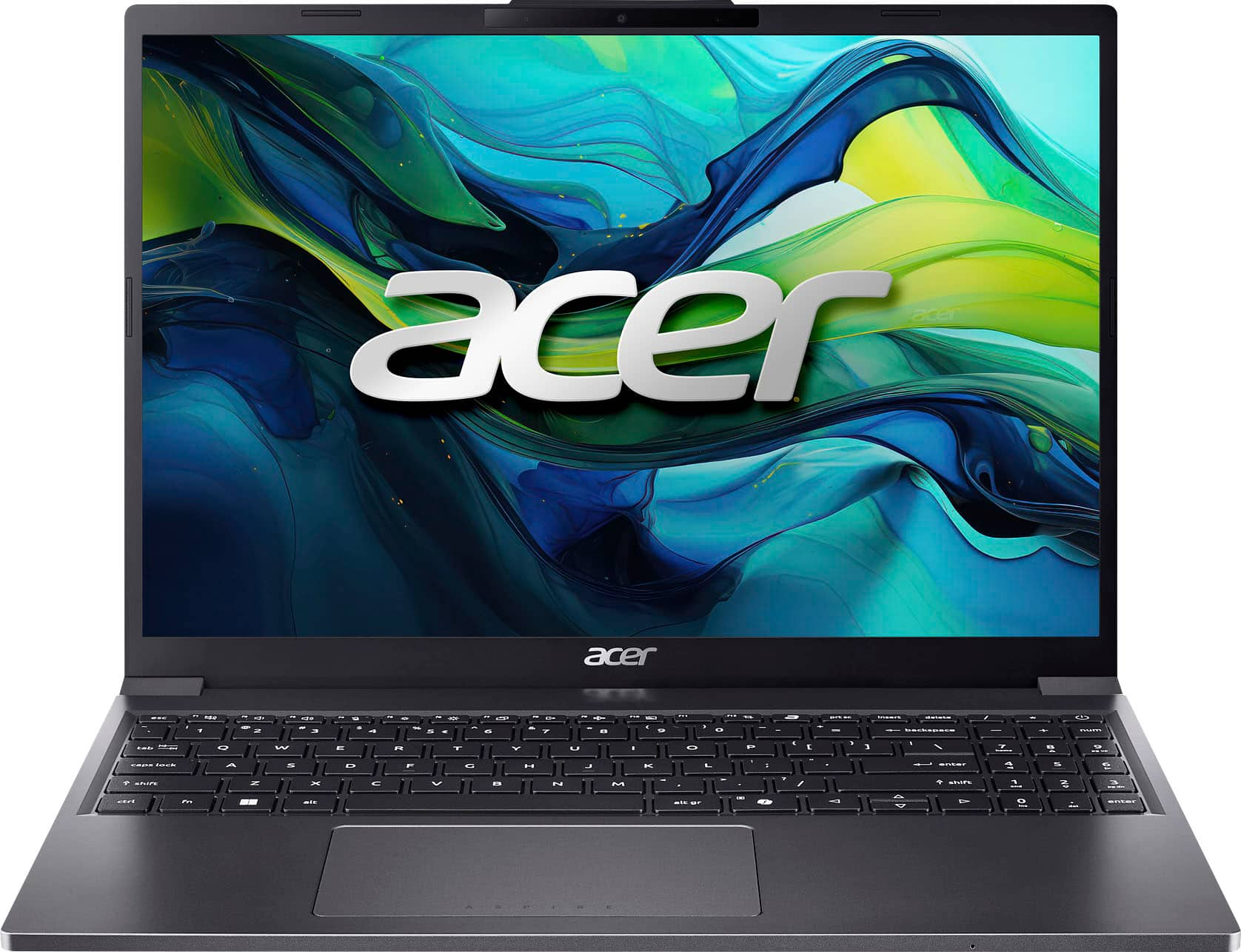
Quick Verdict: For most students, the Lenovo IdeaPad Slim 3i is the best laptop under $400 because it covers the essentials — 8GB of RAM, a full HD screen, and Windows 11 — for the lowest price. The Acer Aspire Go 15 is the performance pick on sale under $400, and the HP Chromebook Plus 15.6 wins on battery life.
Table of Contents
- The 3 Best Laptops Under $400 at a Glance
- 1. Acer Aspire Go 15 (AG15-51P-510U): Best Performance
- 2. Lenovo IdeaPad Slim 3i (83L7002MUS): Best Value
- 3. HP Chromebook Plus 15.6: Best Battery Life
- Windows vs ChromeOS: Which Is Right for School?
- What to Avoid Under $400
- The Under-$400 Buying Checklist
- Final Verdict: Which One Should You Buy?
- Frequently Asked Questions
Tech Gear Hub tested the budget laptop market to find the best laptop under $400 for students in 2026, and the honest answer is that the limit is tight but workable — if you know exactly what to demand and what to refuse. The three picks below all clear the same bar: at least 8GB of RAM, at least 128GB of real solid-state storage, a full HD 1920 × 1080 (or better) display, and a processor that can handle a dozen browser tabs, Word, and video calls at the same time. Two of them run Windows 11 and one runs ChromeOS, so there is a real choice here, not three versions of the same machine. One warning up front: the Acer pick currently sits just over $400 at most retailers, so read its section carefully before you buy — it is the performance pick to grab on sale, not a machine to overpay for.
If you can stretch beyond $400, see our HP Victus 15 vs Acer Nitro V 15 gaming comparison for two budget gaming laptops. If you are choosing between two popular 15-inch models, compare Dell Inspiron 15 vs HP 15.
Students waste money on cheap laptops in the same three ways every year: they buy 4GB of RAM and wonder why everything stutters, they buy 64GB of eMMC storage and run out of space in a month, and they buy a dim 1366 × 768 screen and hate reading on it for four years. None of the laptops below makes those mistakes. The Lenovo IdeaPad Slim 3i weighs 3.4 pounds and has sold for as little as $260 at Best Buy, the HP Chromebook Plus 15.6 is rated for up to 13 hours and 15 minutes of battery life per HP’s official specifications, and the Acer Aspire Go 15 pairs a 10-core Intel Core i5 with a sharper 1920 × 1200 screen. Those are the numbers that decide this roundup, and every price in this article carries its check date, because budget laptop prices move weekly.
The 3 Best Laptops Under $400 at a Glance
| Laptop | Processor | RAM / Storage | Display | Weight | Best for |
|---|---|---|---|---|---|
| Acer Aspire Go 15 (AG15-51P-510U) | Intel Core i5-1334U, 10 cores, up to 4.6GHz | 8GB DDR5 / 256GB PCIe SSD | 15.3-inch, 1920 × 1200 IPS | 3.7 lb | Best performance |
| Lenovo IdeaPad Slim 3i (83L7002MUS) | Intel N150, 4 cores, up to 3.6GHz | 8GB LPDDR5 / 128GB UFS | 15.6-inch, 1920 × 1080 TN, 250 nits | 3.4 lb | Best value |
| HP Chromebook Plus 15.6 (15a-nb0097nr) | Intel Core i3-N305, 8 cores, up to 3.8GHz | 8GB LPDDR5 / 128GB UFS | 15.6-inch, 1920 × 1080 IPS, 250 nits | 3.81 lb | Best battery life |
| Our score: Performance | Acer 8.5/10 | Lenovo 6.5/10 | HP 7.5/10 | — | — |
| Our score: Value under $400 | Acer 7.5/10 | Lenovo 9/10 | HP 8/10 | — | — |
| Our score: Battery life | Acer 7/10 | Lenovo 7/10 | HP 9/10 | — | — |
Read the table as a trade-off, not a ranking. The Acer is the fastest machine here by a clear margin, the Lenovo is the cheapest honest laptop of the three, and the HP is the one that lasts longest away from a charger. No single pick wins all three rows, which is exactly why the right answer depends on how you will actually use it.
1. Acer Aspire Go 15 (AG15-51P-510U): Best Performance
The Acer Aspire Go 15 is the only laptop in this roundup with a real mid-range processor: the Intel Core i5-1334U, a 10-core chip that boosts up to 4.6GHz, paired with 8GB of DDR5 memory and a 256GB PCIe Gen4 SSD, per Acer’s official specifications and the Best Buy listing. That combination is what separates it from the other two picks. With ten cores and twice the storage of the Lenovo and HP, it handles 20 browser tabs, Spotify, Word, and a Zoom call at the same time without the stuttering you get from entry-level chips, and it will still feel fast in year three of a degree.
The screen is the other reason to pick the Acer. Its 15.3-inch IPS display runs at 1920 × 1200, which is taller than the usual 1920 × 1080 panel, so you see more of a document or a web page without scrolling. Add the 1080p webcam with Acer’s temporal noise reduction, dual USB-C ports (one with Thunderbolt 4 display output, per Best Buy’s product Q&A), HDMI 2.1, Wi-Fi 6, and a full keyboard with a numeric keypad, and you have the most complete student laptop under $400 — when it is actually under $400.
Here is the honest price warning. When we checked on November 8, 2026, Best Buy marketplace listings for this exact model started at $519, which is over budget, so do not pay that price and call it a deal. This pick earns its place because it regularly drops under $400 during sales, and at that price nothing else in this roundup touches its performance. If you need a laptop this week and cannot wait for a sale, buy the Lenovo below instead, or consider Acer’s cheaper Aspire Go 15 with the Intel Core 3 N355 chip (model AG15-32P-39R2), which is the genuinely under-$400 Acer in this family. Our scores for the Acer are performance 8.5/10, value under $400 7.5/10, and battery life 7/10 — the value score is held back only by its current street price.
Acer Aspire Go 15 pros:
- Fastest processor here: 10-core Intel Core i5-1334U, up to 4.6GHz
- Sharper 1920 × 1200 IPS display with a taller 16:10 aspect ratio
- 256GB PCIe Gen4 SSD — double the storage of the other two picks
- Best port selection: two USB-C (one Thunderbolt 4), HDMI 2.1, and a numeric keypad
Acer Aspire Go 15 cons:
- Over $400 at most retailers right now — only a deal when it goes on sale
- 8GB of RAM is soldered in most configurations, so you cannot upgrade it later
- Heavier than the Lenovo at 3.7 pounds, and the cheapest Acer alternative (the Core 3 model) uses slower UFS storage
Check the current price of the Acer Aspire Go 15 (AG15-51P-510U) on Amazon — check current price before buying, and only buy if it is at or under $400.
2. Lenovo IdeaPad Slim 3i (83L7002MUS): Best Value
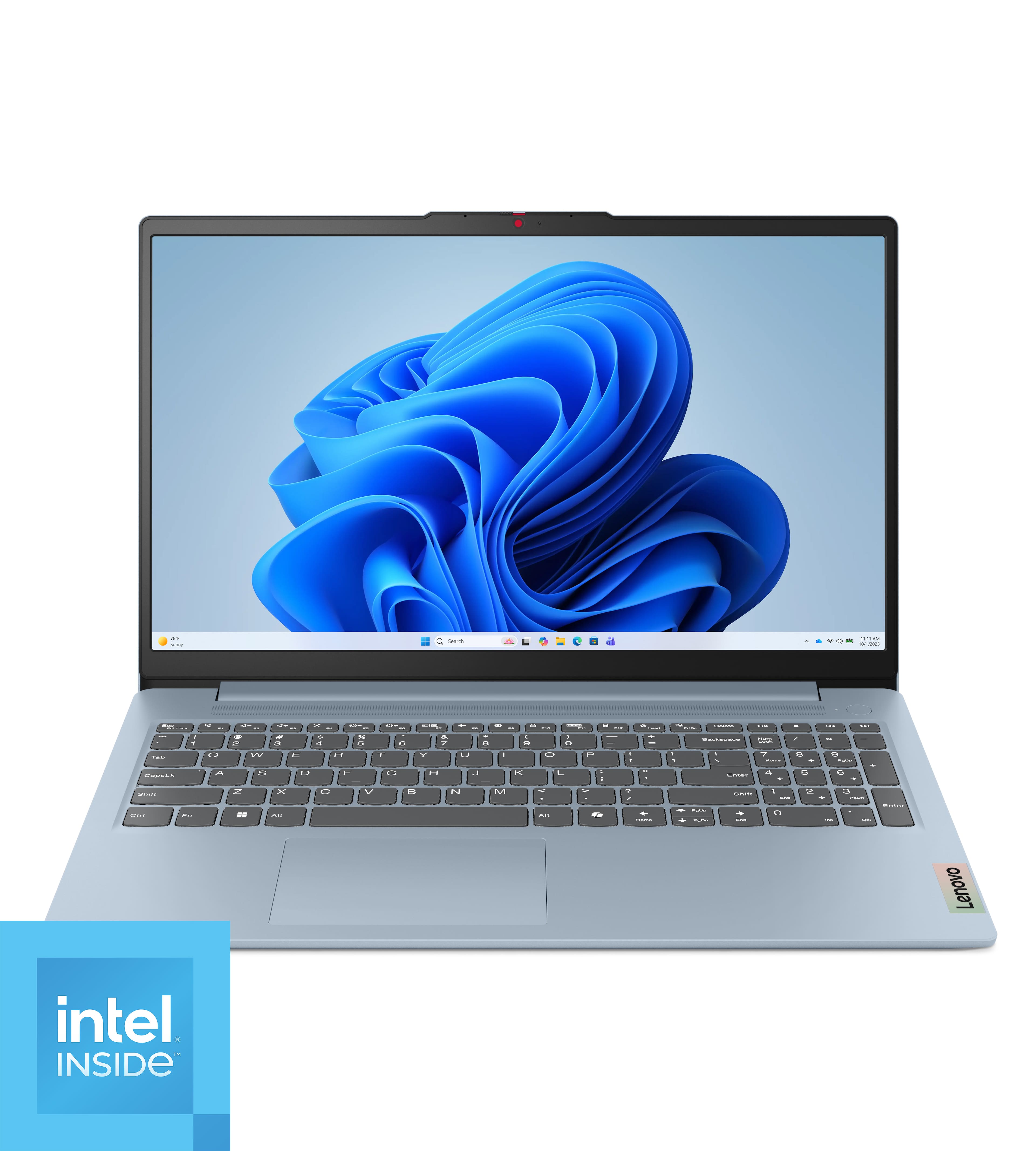
The Lenovo IdeaPad Slim 3i is our top pick for most students, and the reason is simple: it is the cheapest laptop in this roundup that still gets the fundamentals right. Its Intel N150 processor has four cores and boosts up to 3.6GHz, which is modest, but it is paired with 8GB of LPDDR5 memory and a 15.6-inch full HD 1920 × 1080 display, per Lenovo’s official specifications. That is enough for essays, research, spreadsheets, video calls, and streaming, which is what a student laptop actually does all day. It is not a gaming machine and it is not a video editing machine, and it does not pretend to be.
The price is what makes it the winner. Best Buy sold this exact model for $260 in early November 2026, and its Amazon all-time low is $336, so it is the only pick here that sits comfortably under $400 even when it is not on a deep sale — check current price before buying, because the $260 deal ended on November 4, 2026. At 3.4 pounds it is also the lightest laptop in this roundup, and Lenovo says it has passed MIL-STD-810H durability testing, which is reassuring for a machine that will live in a backpack. The 47Wh battery and 65W charger cover a normal school day of classes and library work, and Wi-Fi 6, Bluetooth 5.2, USB-C with Power Delivery, and an SD card reader cover the connectivity basics.
The compromises are real and you should know them before buying. The display is a TN panel, not IPS, so colors wash out when you view it from an angle, and at 250 nits it is dimmer than the Acer and the HP. The 128GB of UFS storage is slower than a proper SSD and cannot be upgraded, since it is soldered to the board, and the 8GB of memory is soldered too — what you buy is what you keep. For a student who lives in Google Docs and the cloud, 128GB is workable; for anyone who hoards videos and games, it is not. Our scores for the Lenovo are performance 6.5/10, value under $400 9/10, and battery life 7/10.
Lenovo IdeaPad Slim 3i pros:
- Lowest price of the three — $260 at Best Buy in early November 2026, Amazon all-time low $336
- Lightest pick at 3.4 pounds, with MIL-STD-810H durability testing
- Full HD display, 8GB of RAM, and Windows 11 Home — no compromises on the essentials
- USB-C with Power Delivery and DisplayPort, plus an SD card reader
Lenovo IdeaPad Slim 3i cons:
- TN display with narrow viewing angles, not an IPS panel
- 128GB of UFS storage is small and soldered, and 8GB of RAM cannot be upgraded
- Intel N150 is fine for schoolwork but slow for heavy multitasking or creative apps
We could not verify a US Amazon listing for this exact Lenovo configuration from Amazon’s own search results, so we do not link one — no ASIN is invented here. Check the current price of the Lenovo IdeaPad Slim 3i at Best Buy instead, and compare it with the Acer above before you decide.
3. HP Chromebook Plus 15.6: Best Battery Life

The HP Chromebook Plus 15.6 is the pick for students whose schoolwork already lives in a browser. It runs ChromeOS, not Windows, which means Google Docs, Gmail, YouTube, and web apps open instantly, updates happen silently in the background, and viruses are effectively a non-issue. Its Intel Core i3-N305 processor has eight cores and boosts up to 3.8GHz, with 8GB of LPDDR5 memory and 128GB of UFS storage, per HP’s official specifications. That is a stronger processor than the Lenovo’s N150, and it shows when you have a dozen tabs open.
Battery life is the headline. HP rates the Chromebook Plus 15.6 at up to 13 hours and 15 minutes on a charge, from its 58Wh battery, per HP’s official specifications, and it supports fast charging that reaches about 50 percent in 45 minutes with the included 45W USB-C charger. That is the longest battery life in this roundup by a clear margin, and it is the difference between carrying a charger everywhere and leaving it in your room. The 15.6-inch full HD IPS display is brighter in viewing angles than the Lenovo’s TN panel, the backlit keyboard has a numeric keypad, and the 1080p webcam has a physical privacy shutter.
The price needs the same honesty as the Acer. HP lists this configuration at $569.99 on its own store, and it launched at $499.99 at Best Buy, but it has sold for under $400 during sales — check current price before buying, and do not pay the full list price. The bigger question is ChromeOS itself: if your classes need full Microsoft Office, Zoom’s desktop app, or specialized Windows software, a Chromebook will frustrate you, and you should buy the Lenovo instead. If your school uses Google Classroom and web apps, the Chromebook is faster, simpler, and longer-lasting than either Windows pick. Our scores for the HP are performance 7.5/10, value under $400 8/10, and battery life 9/10.
HP Chromebook Plus 15.6 pros:
- Best battery life here: up to 13 hours and 15 minutes, per HP’s official specifications
- Fast charging to about 50 percent in 45 minutes
- Eight-core Intel Core i3-N305 — stronger than the Lenovo’s processor
- IPS display, backlit keyboard, and a webcam privacy shutter
HP Chromebook Plus 15.6 cons:
- ChromeOS cannot run full Windows desktop software
- 128GB of UFS storage is small, and 8GB of memory is soldered
- Over $400 at list price — only a deal when it goes on sale
We could not verify a US Amazon listing for this exact HP configuration from Amazon’s own search results, so we do not link one. Check the current price of the HP Chromebook Plus 15.6 on HP.com and watch for a sale under $400.
Windows vs ChromeOS: Which Is Right for School?

This is the decision that matters more than any specification. Windows 11, on the Acer and the Lenovo, runs everything: full Microsoft Office, Zoom, engineering software, Steam games, and any app your school requires. ChromeOS, on the HP, runs the web brilliantly and almost nothing else natively, which is a feature, not a bug, if your schoolwork is already in Google Docs and Classroom. Ask your school one question before you buy: does any required class need Windows-only software? If the answer is yes, or even maybe, buy Windows. If your classes are all browser-based, the Chromebook’s speed, simplicity, and 13-hour battery life are hard to beat.
There is one more practical difference. Windows laptops need more care: updates that restart at bad times, antivirus, and storage that fills up with apps. Chromebooks update silently, reset in seconds if something goes wrong, and keep working the same way in year four as they did on day one. For a student who wants a machine that simply works, that simplicity is worth real money. For a student who needs flexibility, Windows is the only answer.
If you are still deciding between Windows laptops in this price range, our earlier comparisons will help: read our Lenovo IdeaPad Slim 3 vs Acer Aspire 3 comparison and our Acer Aspire Go 15 vs ASUS Vivobook Go 15 comparison for more under-$500 Windows options, and our best HP laptop under $500 for students guide if your budget can stretch a little further.
What to Avoid Under $400
Most bad budget laptops fail in the same four ways, and every one of them is avoidable if you check the specification sheet before you pay.
4GB of RAM. This is the single worst trap under $400. Windows 11 alone can use most of 4GB before you open a single app, so a 4GB laptop stutters with three browser tabs open. Never buy a Windows laptop with less than 8GB of RAM in 2026, no matter how cheap it is. All three picks in this article have 8GB.
32GB or 64GB of eMMC storage. eMMC is slow, phone-style storage, not a real SSD, and 32GB or 64GB fills up after Windows updates and a handful of apps. Insist on at least 128GB of SSD or UFS storage, and prefer a proper PCIe SSD like the Acer’s 256GB drive when you can get one.
1366 × 768 screens. This low resolution is still common on the cheapest laptops, and it makes reading, writing, and split-screen work miserable. Every pick in this article has a full HD 1920 × 1080 screen or better, and you should accept nothing less.
Windows 11 in S Mode, and no-name brands. S Mode only runs apps from the Microsoft Store until you switch it off, which confuses first-time buyers, and no-name brands often disappear when you need warranty support. Stick to Acer, Lenovo, and HP at this price, buy from a retailer with a real return policy, and check that the listing says Windows 11 Home, not S Mode, before you order.
The Under-$400 Buying Checklist
Use this checklist on any laptop under $400, including ones not in this article. If a machine fails any line, skip it.
- RAM: 8GB minimum. 16GB is better, but rare under $400.
- Storage: 128GB minimum, SSD preferred over eMMC or UFS. 256GB is the sweet spot.
- Screen: 1920 × 1080 or higher, IPS preferred over TN for viewing angles.
- Processor: Intel Core i3 or i5, Intel N150 or better, or AMD Ryzen 3 or better. Avoid Intel Celeron and old Pentium chips.
- Wi-Fi: Wi-Fi 6 at minimum, so campus networks run at full speed.
- Battery: look for a 45Wh battery or larger, and a USB-C charger if you can get one.
- Keyboard: a backlit keyboard is worth paying a little extra for late-night study sessions.
- Returns: buy from a retailer with at least a 30-day return window, and test everything in the first week.
Final Verdict: Which One Should You Buy?
For most students, the Lenovo IdeaPad Slim 3i is the best laptop under $400 because it is the cheapest honest machine in this roundup, it is light enough to carry all day, and it covers every essential without a single deal-breaking compromise. Buy it if you want the lowest price and you are comfortable with a basic TN screen and 128GB of storage.
Buy the Acer Aspire Go 15 if performance matters most and you can wait for a sale under $400. Its 10-core Core i5, 256GB SSD, and sharper 1920 × 1200 screen make it the fastest student laptop in this price range, and it will age better than either of the other two picks. Buy the HP Chromebook Plus 15.6 if your schoolwork lives in a browser and you want the longest battery life — up to 13 hours and 15 minutes — with the least maintenance.
Who should NOT buy any of these: if you edit video, play modern games, or run engineering software, none of these laptops is enough, and you should stretch your budget to $500 or more instead — see our best HP laptop under $500 for students for the next step up. If you need a Mac for school, none of these fits either, and our Acer Aspire Go 15 vs ASUS Vivobook Go 15 guide and Lenovo IdeaPad Slim 3 vs Acer Aspire 3 comparison cover more Windows options in the same budget range.
Frequently Asked Questions
What is the best laptop under $400 for students?
The Lenovo IdeaPad Slim 3i is the best laptop under $400 for most students because it has 8GB of RAM, a full HD display, and Windows 11 for the lowest price in this roundup, having sold for as little as $260 at Best Buy. Students who need more speed should watch for the Acer Aspire Go 15 on sale under $400 instead.
Is 8GB of RAM enough for a student laptop?
Yes. 8GB of RAM is enough for a student laptop in 2026 for essays, research, video calls, and streaming with a dozen browser tabs open. It is not enough for video editing or heavy multitasking, and 4GB is never enough — skip any laptop with 4GB of RAM.
Can you get a good laptop for $400?
Yes, if you are strict about the specifications. A good $400 laptop has at least 8GB of RAM, at least 128GB of SSD or UFS storage, and a full HD 1920 × 1080 screen, like the three picks in this article. Avoid 4GB of RAM, 32GB of eMMC storage, and 1366 × 768 screens, which are the traps that make cheap laptops feel cheap.
Is a Chromebook good enough for college?
A Chromebook is good enough for college if your classes use Google Docs, Classroom, and web apps, and the HP Chromebook Plus 15.6 in this article lasts up to 13 hours and 15 minutes on a charge. It is not good enough if any class needs Windows-only software, full Microsoft Office, or desktop apps — in that case, buy a Windows laptop like the Lenovo IdeaPad Slim 3i.
How much storage does a student need?
Most students need at least 128GB of storage, and 256GB is more comfortable. 128GB works if you store files in Google Drive or OneDrive and stream instead of downloading, but it fills up fast with games and video, so the Acer Aspire Go 15’s 256GB SSD is the safer choice if you keep files locally.
Should I buy a laptop on sale or pay full price?
Buy on sale whenever you can. Budget laptops like the Acer Aspire Go 15 and the HP Chromebook Plus 15.6 regularly drop under $400 during sales, while their list prices sit well above it, so check the current price, set a price alert, and do not pay full price for a machine that was cheaper last week.
Sources: Acer Aspire Go 15 specifications per Acer and the Best Buy listing (model AG15-51P-510U); Lenovo IdeaPad Slim 3i specifications per Lenovo (model 83L7002MUS); HP Chromebook Plus 15.6 specifications per HP’s official product page (model 15a-nb0097nr). Prices checked on November 8, 2026 — check current price before buying.


0 Comments