
By Tech Gear Hub • Last updated: November 3, 2026
As an Amazon Associate I earn from qualifying purchases.
Tech Gear Hub compared the Acer Aspire Go 15 and the ASUS Vivobook Go 15 to find the best budget laptop under $400 for students in 2026. Both are 15.6-inch Windows 11 laptops with 8GB of RAM, both street-priced roughly between $300 and $400, and both aimed squarely at schoolwork, essays, video calls, and everyday browsing. But under the surface they make very different trade-offs — and one of them gives students twice the storage for nearly the same money.
Quick Verdict: For most students, the ASUS Vivobook Go 15 is the better buy: its 256GB SSD is double the Acer's 128GB storage, its tougher military-grade build survives backpack life better, and its sale price usually lands in the same $330–$380 range — so double the storage and a tougher build beat the Acer's small price edge.
Contents
At a Glance: Specs Side by Side
| Spec | Acer Aspire Go 15 (AG15-32P-39R2) | ASUS Vivobook Go 15 (E1504FA-AB34) |
|---|
| Display | 15.6-inch FHD (1920x1080) IPS | 15.6-inch FHD (1920x1080) |
| Processor | Intel Core 3 N355, 8 cores, up to 3.9GHz | AMD Ryzen 3 7320U, up to 4.1GHz |
| RAM | 8GB DDR5 | 8GB LPDDR5 |
| Storage | 128GB UFS | 256GB PCIe SSD |
| Operating system | Windows 11 Home in S Mode | Windows 11 Home |
| Weight / size | About 3.81 lbs; 14.3 x 9.4 x 0.78 inches | Slim 15.6-inch design with 180° lay-flat hinge |
| Extras | Wi-Fi 6 | Military-grade durability, webcam shield, fast charging |
| Typical street price | Roughly $300–$400 (check current price) | Roughly $330–$380 on sale (check current price) |
The headline difference is storage, and it is bigger than it looks on paper. The Vivobook's 256GB SSD is exactly double the Aspire's 128GB, and it is a faster PCIe SSD rather than UFS storage — so Windows, apps, and class files all get more room and more speed. On a student laptop that has to last four years of coursework, that gap matters more than any other single spec here.
Our Own Scores
These are Tech Gear Hub's own 10-point scores, judged on what matters to students — not manufacturer claims:
| Criterion | Acer Aspire Go 15 | ASUS Vivobook Go 15 |
|---|
| Storage | 6.5/10 | 8.5/10 |
| Performance | 7.5/10 | 8/10 |
| Value | 8.5/10 | 8/10 |
Storage is the clearest win: 8.5/10 for the Vivobook against 6.5/10 for the Aspire, because 128GB fills up fast once Windows, Office, and a semester of files share the same drive. Performance is close — the Ryzen 3 7320U's higher 4.1GHz boost edges the Core 3 N355's 3.9GHz — so the Vivobook takes 8/10 against 7.5/10. Value flips the other way: when the Aspire dips toward $300, it earns 8.5/10 against the Vivobook's 8/10, because at that gap the savings are real.
Acer Aspire Go 15: The Cheaper Ticket In
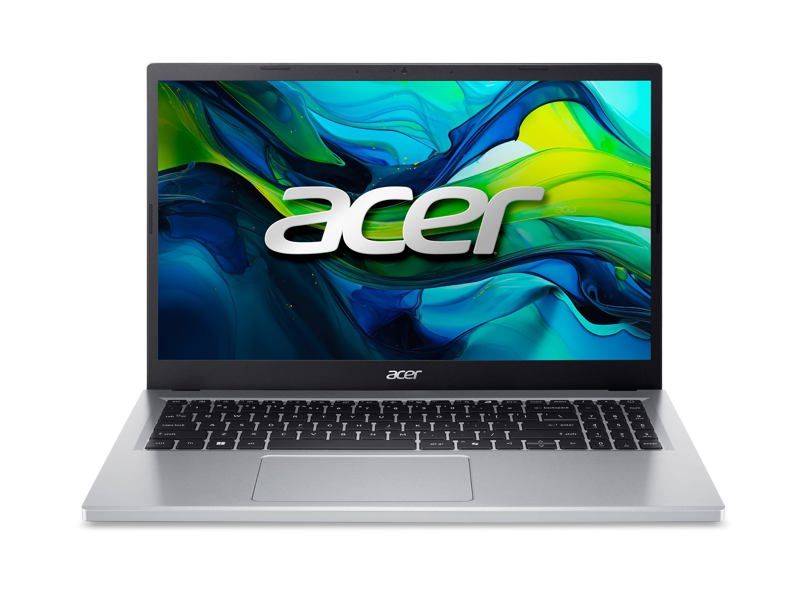
The Acer Aspire Go 15 (AG15-32P-39R2) is the simplest route to a usable student laptop. Its 15.6-inch Full HD IPS display is sharp enough for essays and video lectures, the Intel Core 3 N355 with 8 cores handles everyday multitasking, and 8GB of DDR5 RAM keeps a dozen browser tabs and a document open without drama. At about 3.81 lbs and 0.78 inches thick, it is portable enough for a backpack without being an ultralight.
Pros: Lowest street price of the pair (roughly $300–$400, check current price); crisp 15.6-inch FHD IPS display; 8-core Intel Core 3 N355; 8GB DDR5; Wi-Fi 6; light enough at 3.81 lbs.
Cons: Only 128GB of UFS storage — the smallest capacity here, and UFS is slower than a PCIe SSD; ships in Windows 11 Home in S Mode, which limits app installs until you switch out of S Mode (free, but an extra step); no durability rating or webcam shield.
Check the current price of the Acer Aspire Go 15 on Amazon — prices move often, so check current price before buying.
ASUS Vivobook Go 15: The Smarter Student Buy

The ASUS Vivobook Go 15 (E1504FA-AB34) is the laptop we would hand to most students. Its AMD Ryzen 3 7320U boosts to 4.1GHz, its 8GB of LPDDR5 memory is fast and efficient, and its 15.6-inch FHD display matches the Acer for classwork and streaming. Where it pulls away is everything around the specs: a 256GB PCIe SSD with double the Acer's capacity, military-grade durability testing for backpack knocks, a physical webcam shield for privacy, fast charging for between-class top-ups, and a 180° lay-flat hinge that makes sharing notes with a classmate genuinely easy.
Pros: 256GB PCIe SSD — double the Acer's storage and faster; military-grade durability; webcam privacy shield; fast charging; 180° lay-flat hinge; full Windows 11 Home (no S Mode limitation).
Cons: Usually a little pricier on sale (roughly $330–$380, check current price); no IPS panel claim on this configuration; still an entry-level Ryzen 3, so heavy video editing or AAA gaming is out of reach for both laptops.
Check the current price of the ASUS Vivobook Go 15 on Amazon — prices move often, so check current price before buying.
For the full manufacturer spec sheet, see ASUS's official Vivobook Go 15 page. The Acer's specifications above are per its official listing details.
Who Should Buy — and Who Should NOT
Who should buy the Vivobook Go 15: Most students — especially anyone keeping the laptop for multiple school years, carrying it daily, or storing lots of files locally. Double the storage plus a tougher build is worth a small price premium.
Who should buy the Aspire Go 15 instead: Budget-first buyers who find it clearly cheaper (toward $300) and mostly work in the cloud, where 128GB is less of a constraint.
Who should NOT buy either: Students who need serious performance — video editing, 3D work, or modern gaming — should save for a higher tier. Both of these are everyday schoolwork machines, and neither pretends otherwise. If you are torn between other budget options, our Lenovo IdeaPad Slim 3 vs Acer Aspire 3 comparison and our HP Stream 14 review cover two more ways to spend a small laptop budget.
Frequently Asked Questions
Which is better for students, the Acer Aspire Go 15 or the ASUS Vivobook Go 15?
For most students, the ASUS Vivobook Go 15. Its 256GB SSD is double the Acer's 128GB storage, and its military-grade build and webcam shield suit daily campus life better.
Is 128GB of storage enough for a student laptop?
It can be enough if most of your work lives in the cloud, but it fills up fast. Windows, apps, and a semester of files share that 128GB, which is why the Vivobook's 256GB SSD scores higher in our comparison.
What is Windows 11 in S Mode on the Acer Aspire Go 15?
S Mode limits app installs to the Microsoft Store for security and speed. You can switch out of S Mode for free, but it is an extra step the Vivobook's full Windows 11 Home does not require.
Can either laptop handle gaming or video editing?
Not seriously. Both are entry-level everyday laptops for schoolwork, browsing, and streaming. Heavy video editing or modern AAA gaming needs a higher-performance machine.
How much do these laptops cost?
Street prices move often: the Acer Aspire Go 15 typically runs roughly $300–$400, and the ASUS Vivobook Go 15 typically goes on sale around $330–$380. Always check current price before buying.
Which one should I buy if the Acer is much cheaper?
If the Acer Aspire Go 15 is clearly cheaper — toward $300 — and you work mostly in the cloud, take the Acer and pocket the savings. Otherwise, the Vivobook's double storage and tougher build win.


Comments
Post a Comment