
MacBook Air M4 vs MacBook Pro M3: Which Should You Buy in 2026?
By Tech Gear Hub • Last updated: November 8, 2026
As an Amazon Associate I earn from qualifying purchases. Prices change often — always check the current price before you buy.

Quick Verdict: For most people, the MacBook Air M4 is the better buy because it is lighter, fanless, cheaper renewed, and fast enough for school, office work, and everyday creative tasks. The MacBook Pro M3 only earns its extra weight and cost if you need its brighter 120Hz XDR display, HDMI port, and longer battery for video editing.
Table of Contents
- MacBook Air M4 vs MacBook Pro M3 at a Glance
- MacBook Air M4 (13-inch): The Lightweight Pick
- MacBook Pro M3 (14-inch): The Pro Pick
- Display: The Biggest Difference Between Them
- Performance: M4 vs M3 in Real Use
- Battery Life and Charging
- Ports, Keyboard, and Everyday Design
- Price and Value in 2026
- Which MacBook Should You Buy?
- Frequently Asked Questions
Tech Gear Hub compared the 13-inch MacBook Air with the M4 chip against the 14-inch MacBook Pro with the M3 chip to answer a question that sounds simple but is not: is the older Pro still worth buying in 2026, or does the newer Air make it pointless? Both laptops are discontinued now, so this is a renewed and remaining-stock buying decision, not a trip to the Apple Store for a brand-new machine. The short answer is that the Air M4 wins for most buyers, because it pairs a newer chip with a lighter body and a lower renewed price, while the Pro M3 wins only for buyers who will genuinely use its professional display and extra ports every day. This guide compares their full specifications, per Apple’s official specifications, and explains exactly who should buy each one.
Here is the context that matters most. Apple launched the MacBook Air M4 on March 5, 2025, starting at $999, and discontinued it in March 2026 when the MacBook Air M5 arrived. Apple launched the 14-inch MacBook Pro M3 on October 30, 2023, starting at $1,599, and discontinued it in October 2024 when the M4 Pro models arrived. Neither machine is sold new by Apple anymore, so your real choice in late 2026 is between a renewed Air M4, which Amazon Renewed lists around $949 (checked on November 8, 2026), and a renewed or remaining-stock Pro M3, which costs more and is harder to find in the exact configuration you want. That $600 launch-price gap has shrunk on the renewed market, but it has not disappeared, and it shapes the whole verdict.
MacBook Air M4 vs MacBook Pro M3 at a Glance
The table below puts the two laptops side by side. Our own 10-point scores are at the bottom: they are Tech Gear Hub’s ratings, based on the specifications and the trade-offs in this article, not Apple’s numbers.
| Feature | MacBook Air M4 (13-inch) | MacBook Pro M3 (14-inch) |
|---|---|---|
| Chip | Apple M4, 10-core CPU, 8-core GPU (base); up to 10-core GPU | Apple M3, 8-core CPU, 10-core GPU |
| Memory (base) | 16GB unified memory | 8GB at launch; 16GB standard from March 2024 |
| Storage (base) | 256GB SSD | 512GB SSD |
| Display | 13.6-inch Liquid Retina, 2560 × 1664, 500 nits, 60Hz | 14.2-inch Liquid Retina XDR, 3024 × 1964, 1000 nits sustained, 1600 nits peak HDR, ProMotion 120Hz |
| Battery (Apple rated) | Up to 18 hours video streaming; 53.8Wh | Up to 22 hours video playback; 70Wh |
| Weight | 2.7 pounds (1.24 kg) | 3.4 pounds (1.55 kg) |
| Cooling | Fanless (silent) | Active cooling (fans) |
| Ports | 2 × Thunderbolt 4, MagSafe 3, 3.5mm headphone jack | 2 × Thunderbolt 4, HDMI, SDXC card slot, MagSafe 3, 3.5mm headphone jack |
| Camera | 12MP Center Stage camera | 1080p FaceTime HD camera |
| Launch price | From $999 (March 2025) | From $1,599 (October 2023) |
| Status in 2026 | Discontinued March 2026; buy renewed | Discontinued October 2024; buy renewed or remaining stock |
| Our score: Portability | 9.5/10 | 7.5/10 |
| Our score: Display quality | 7.5/10 | 9.5/10 |
| Our score: Value in 2026 | 9/10 | 7/10 |
Two plain facts carry the whole comparison. The MacBook Air M4 weighs 2.7 pounds and runs for up to 18 hours of video streaming, while the MacBook Pro M3 weighs 3.4 pounds and runs for up to 22 hours of video playback. And the Pro M3’s display reaches 1000 nits of sustained brightness and 1600 nits peak for HDR content, exactly double the Air M4’s 500 nits, which is the single biggest reason to pay more for the Pro.
MacBook Air M4 (13-inch): The Lightweight Pick

The MacBook Air M4 is the newest chip in the thinner, lighter body, and that combination is why it wins for most people. Its M4 chip has a 10-core CPU and, in the base $999 configuration, an 8-core GPU; the 10-core GPU only arrives if you pay for a higher storage or memory configuration, per Apple’s official specifications. That detail matters, because some listings describe every Air M4 as a 10-core GPU machine, and the base model simply is not. For everyday work the difference is small, but honesty about it matters when you are comparing two machines side by side.
What you feel every day is the weight and the silence. At 2.7 pounds with no fan at all, the Air M4 disappears into a bag and never makes a sound in a quiet library or meeting room. Its 13.6-inch Liquid Retina display is sharp at 2560 × 1664 and bright enough at 500 nits for indoor work and shaded outdoor use. The 12MP Center Stage camera keeps you framed on video calls, and the Air supports up to two external 6K displays in addition to its built-in screen, which was a genuine upgrade over older Air models. Battery life is rated at up to 18 hours of video streaming and up to 15 hours of wireless web browsing, per Apple’s official specifications, from a 53.8Wh battery.
MacBook Air M4 pros:
- Newer M4 chip with a 10-core CPU, and 16GB of unified memory as standard
- Just 2.7 pounds, fanless, and completely silent
- Up to 18 hours of video streaming per charge
- 12MP Center Stage camera and support for two external 6K displays
- Lowest renewed price of the two — around $949 on Amazon Renewed (checked on November 8, 2026)
MacBook Air M4 cons:
- Base storage is only 256GB, and neither the memory nor the storage can be upgraded later
- 500-nit, 60Hz display is good but clearly a step below the Pro’s XDR panel
- Only two Thunderbolt 4 ports, no HDMI, and no SD card slot
- Fanless design means sustained heavy workloads will throttle sooner than on the Pro
Our scores for the Air M4 are portability 9.5/10, display quality 7.5/10, and value in 2026 9/10. The value score is the story: you get the newer chip, the lighter body, and 16GB of memory for the lowest price in this comparison.
Check the current price of the renewed MacBook Air M4 (13-inch, 16GB, 256GB) on Amazon — check current price before buying, since renewed stock and prices change daily.
MacBook Pro M3 (14-inch): The Pro Pick
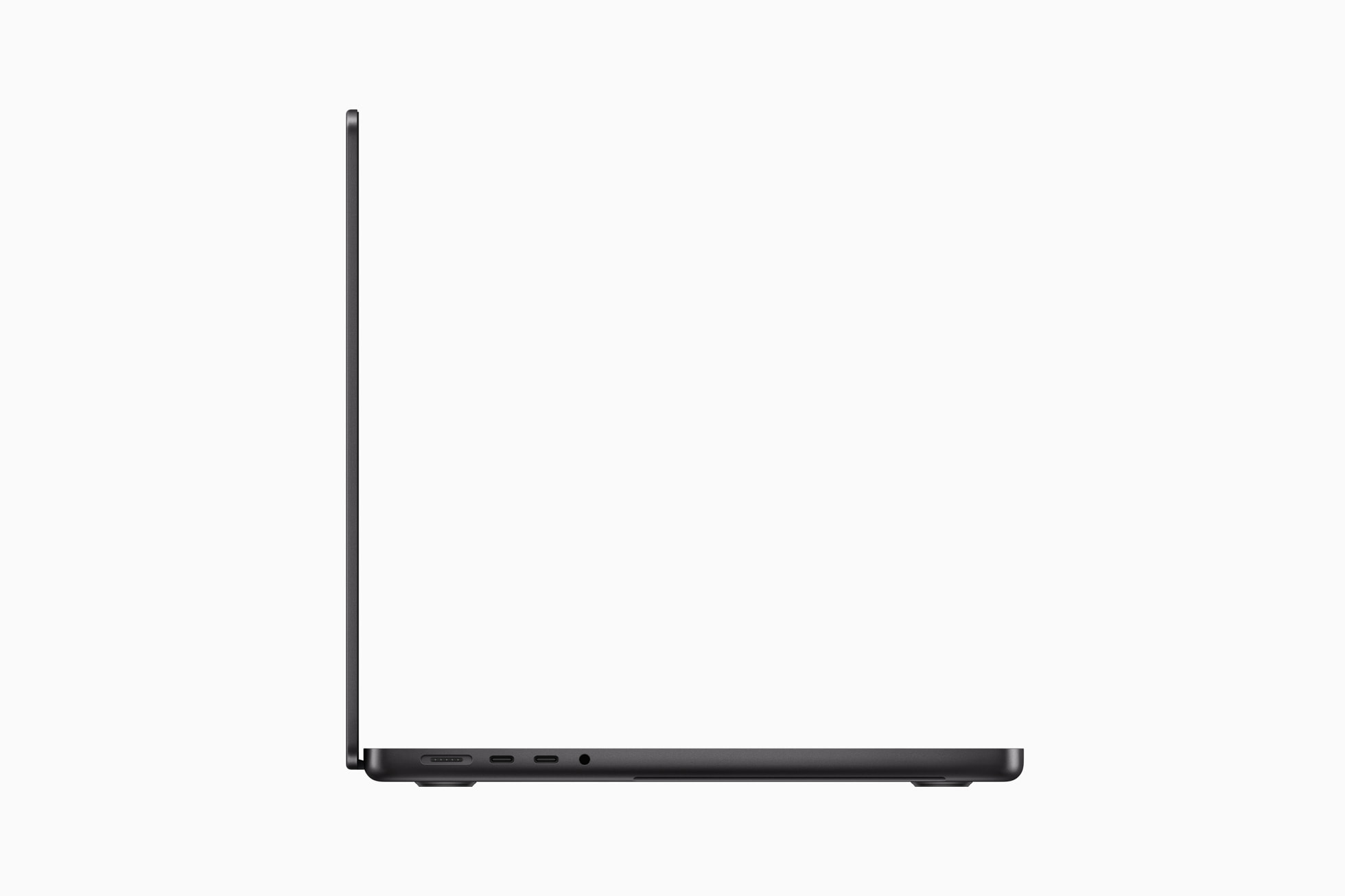
The MacBook Pro M3 is the older chip in the more serious body, and everything about it is built for work that the Air is not designed for. Its M3 chip has an 8-core CPU and a 10-core GPU, and it launched with 8GB of unified memory and 512GB of storage for $1,599; Apple raised the base memory to 16GB in March 2024, so later stock and most renewed listings you will find now carry 16GB, per Apple’s official specifications and EveryMac’s model records. If you are shopping renewed, check the memory figure on the exact listing, because an early 8GB unit is a noticeably worse buy in 2026.
The Pro earns its keep in three places: the display, the battery, and the ports. The 14.2-inch Liquid Retina XDR display runs at 3024 × 1964 with ProMotion up to 120Hz, 1000 nits of sustained brightness, and 1600 nits peak for HDR content, which makes it one of the best laptop screens ever sold at this price. The 70Wh battery is rated for up to 22 hours of video playback and up to 15 hours of wireless web browsing, per Apple’s official specifications, which is four hours more video playback than the Air M4. And the port selection is genuinely complete: two Thunderbolt 4 ports, a full-size HDMI port, an SDXC card slot, MagSafe 3, and a headphone jack, so photographers and video editors can leave the dongle bag at home. Active cooling with fans means the M3 can hold its performance longer under sustained loads like video exports.
MacBook Pro M3 pros:
- 14.2-inch Liquid Retina XDR display with ProMotion 120Hz, 1000 nits sustained brightness, and 1600 nits peak HDR
- Up to 22 hours of video playback from a 70Wh battery
- Full port selection: two Thunderbolt 4 ports, HDMI, SDXC card slot, MagSafe 3, and a 3.5mm headphone jack
- Active cooling holds performance longer in sustained workloads
- 512GB of base storage, double the Air M4’s 256GB
MacBook Pro M3 cons:
- Older M3 chip with an 8-core CPU, and the base model launched with only 8GB of memory
- Heavier at 3.4 pounds, with fans that can be heard under load
- Discontinued in October 2024, so finding the exact configuration you want is harder
- Higher renewed price, with the step-up M3 Pro configuration listed around $1,727 on Amazon (checked on November 8, 2026)
Our scores for the Pro M3 are portability 7.5/10, display quality 9.5/10, and value in 2026 7/10. The display score is the story: the XDR panel is the best reason to buy this machine, and the value score is lower because you pay more for an older chip.
check the current price of the MacBook Pro 14 with M3 Pro chip on Amazon — check current price before buying. There is no verified new base-model M3 listing on Amazon that we could confirm, so we are not linking to a listing we have not verified. Amazon Renewed remains the most reliable route for a base-model Pro M3.
Display: The Biggest Difference Between Them

The 14.2-inch Liquid Retina XDR display is the Pro’s biggest advantage, and it is also the hardest thing to appreciate without seeing both screens side by side. At 3024 × 1964 it is sharper than the Air’s 2560 × 1664 panel, and at 1000 nits of sustained brightness it is twice as bright as the Air’s 500 nits, with 1600 nits peak for HDR content. ProMotion refreshes the screen at up to 120Hz, so scrolling and cursor movement look smoother than the Air’s fixed 60Hz. If you edit photos or video, or you simply watch a lot of HDR films, the Pro’s display is worth real money. If you mostly write documents and browse the web, it is a luxury you will barely notice, and the Air’s display is already excellent.
The display gap is exactly why the Pro M3 still makes sense for photographers and video editors, and why it makes no sense at all for everyone else. For a student or an office worker, a brighter screen does not change the work. For a video editor who grades HDR footage, it changes everything, and it is the one feature the Air cannot match at any price.
Performance: M4 vs M3 in Real Use
Apple’s own numbers make the chip comparison look closer than it feels in everyday use. The MacBook Air M4’s 10-core CPU is roughly 20% faster than the Pro M3’s 8-core CPU in multi-core work, and Apple rates the M4 as up to 2x faster than the M1 Air in everyday tasks, per Apple’s official launch announcements. The Pro M3’s 10-core GPU has more graphics cores than the base Air M4’s 8-core GPU, so it holds a small edge in sustained graphics work, but the gap is smaller than the core counts suggest, because the M4’s newer architecture closes most of it.
For everyday work the two laptops feel identical: documents, browsers with dozens of tabs, video calls, and photo editing all run instantly on both. The difference appears under sustained load. The Pro M3’s fans let its M3 chip hold full speed through a 30-minute video export or a long photo batch without slowing down, which is where the Air’s silent design gives up a little performance to stay cool. For most buyers the Air M4 is fast enough, and the Pro M3 is faster only in the specific workloads it was designed for.
Both machines ship with 16GB of unified memory in the configurations you should buy, and 16GB is the minimum for a laptop you plan to keep for several years. The Air M4 starts at 16GB and cannot be upgraded later, so if you buy the 256GB storage model, make sure the memory is right before you pay. The Pro M3 launched at 8GB, and Apple raised it to 16GB in March 2024, so always verify the exact renewed listing shows 16GB of memory, and skip any 8GB unit, no matter how cheap it looks.
Battery Life and Charging
The Pro M3 wins battery life clearly. Apple rates the 14-inch Pro M3 at up to 22 hours of Apple TV app movie playback and up to 15 hours of wireless web browsing, from its 70Wh battery, per Apple’s official specifications. The Air M4 is rated at up to 18 hours of video streaming and up to 15 hours of wireless web browsing, from its 53.8Wh battery. Both figures are Apple’s lab tests, so real-world use will be lower, but the four-hour video gap is real, and it comes from the Pro’s much larger battery.
Charging is similar on both machines: MagSafe 3 for magnetic charging, plus USB-C charging through the Thunderbolt ports. The Pro M3 ships with a 70W USB-C power adapter, while the base Air M4 ships with a 30W adapter, so the Pro refills its bigger battery faster. Neither machine will leave you hunting for a charger during a normal workday, but if you regularly work long days away from power, the Pro’s extra hours are worth real money.
Ports, Keyboard, and Everyday Design
The Pro M3’s port selection is the most complete here: two Thunderbolt 4 ports, HDMI, an SDXC card slot, MagSafe 3, and a 3.5mm headphone jack. The Air M4 has two Thunderbolt 4 ports, MagSafe 3, and a headphone jack, and nothing else, so external monitors, SD cards, and wired displays all need adapters or a hub. If you are a photographer who unloads SD cards daily, or you present on projectors and TVs, the Pro’s HDMI and SDXC slot save you from carrying dongles forever.
Both machines share Apple’s excellent backlit Magic Keyboard with Touch ID, a large Force Touch trackpad, and a three-mic array with good speakers — the Pro’s six-speaker system sounds fuller, but the Air’s four-speaker system is no embarrassment. The Air’s 12MP Center Stage camera is the better webcam, automatically keeping you centered as you move, while the Pro’s 1080p camera is solid but older. On weight and size, the Air is the clear winner: 2.7 pounds and 0.44 inches thin, against the Pro’s 3.4 pounds and 0.61 inches. Carry both in a bag for a week and the Air’s advantage stops being a specification and becomes something you feel.
Price and Value in 2026
Both laptops launched at very different prices: the Air M4 started at $999 and the Pro M3 started at $1,599, per Apple’s official launch announcements. That $600 gap is the whole value story. On the renewed market in November 2026, the Air M4 13-inch with 16GB and 256GB lists around $949 on Amazon Renewed (checked on November 8, 2026), which is only $50 under its launch price, because it is a newer machine in strong demand. The Pro M3 costs more wherever you find it, and the step-up M3 Pro configuration was listed at $1,799 with discounted prices around $1,727 on Amazon (checked on November 8, 2026) — check current price, since renewed and remaining-stock prices move daily.
Our advice is simple. If your budget is around $950, the Air M4 is the obvious buy: newer chip, lighter body, 16GB standard, and a warranty-backed renewed listing. If your budget stretches past $1,200 and you will use the XDR display and the extra ports for creative work, the Pro M3 earns its premium. If your budget stretches to $1,099, also look at Apple’s current MacBook Air M5, which starts at $1,099 with 512GB of storage as standard — for some buyers, the new machine with a full warranty is a better use of the money than a renewed Pro M3. If you want the full comparison with the current Pro models, read our MacBook Air M4 vs MacBook Pro M4 comparison before you decide.
Which MacBook Should You Buy?
Buy the MacBook Air M4 if: you are a student, a writer, an office worker, or a casual creator; you carry your laptop everywhere; you want the quietest machine; you want the newest chip for the lowest price; or you mostly work in a browser, documents, and light photo or video editing. The Air is also the right pick if you want Apple’s current-generation efficiency and the 12MP Center Stage camera for video calls.
Buy the MacBook Pro M3 if: you edit video or photos for a living or as a serious hobby; you need the brightest, most color-accurate laptop display Apple sells at this price; you want HDMI and an SD card slot without dongles; you need the longest possible battery life; or you run long, heavy workloads that need active cooling. Verify the listing shows 16GB of memory and 512GB of storage before you pay.
Who should NOT buy either: if you need a brand-new laptop with a full Apple warranty and the latest chip, skip both — these are discontinued models, and your money is better spent on the current MacBook Air M5 or a MacBook Pro M4, which you can compare in our Air M4 vs Pro M4 guide. Gamers should also look elsewhere: neither machine is built for serious gaming, and the money buys far more graphics performance in a Windows laptop. And if your budget is under $500, neither MacBook fits — read our HP 15 Ryzen 7 review for students under $500 instead. For the bigger picture on where the MacBook line is heading, including the next-generation models, see our MacBook Pro M6 price, specs, and release date guide.
Frequently Asked Questions
Is the MacBook Air M4 better than the MacBook Pro M3?
For most people, yes. The MacBook Air M4 is the better buy because it has the newer M4 chip, weighs only 2.7 pounds, runs silently with no fan, and costs less renewed, while the Pro M3 only wins if you need its brighter 120Hz XDR display, HDMI port, SD card slot, and longer battery life for creative work.
Is the MacBook Pro M3 still worth buying in 2026?
Yes, for the right buyer. The MacBook Pro M3 is still worth buying in 2026 if you edit video or photos, because its 14.2-inch XDR display, 22-hour battery life, and full port selection remain excellent, but only buy a 16GB model — skip the early 8GB units — and buy renewed from a trusted seller.
Does the MacBook Air M4 have a fan?
No. The MacBook Air M4 has no fan at all, per Apple’s official specifications, so it is completely silent. The trade-off is that sustained heavy workloads may slow down slightly to control heat, while the fan-cooled MacBook Pro M3 holds full speed for longer.
How much RAM does the MacBook Pro M3 have?
The MacBook Pro M3 launched with 8GB of unified memory and 512GB of storage in its $1,599 base model, and Apple raised the base memory to 16GB in March 2024. Always check the memory figure on the exact renewed listing before buying, because 8GB is not enough headroom for a laptop you plan to keep for years.
Is 256GB of storage enough on the MacBook Air M4?
256GB is enough if you store most files in the cloud and do not keep large video libraries locally, but it is tight for video editors and photographers. The MacBook Pro M3’s 512GB base storage is a genuine advantage, and neither laptop’s storage can be upgraded after purchase, so choose carefully.
Should I buy the MacBook Air M5 instead?
Probably, if your budget reaches $1,099. The MacBook Air M5 is Apple’s current model, starts at $1,099 with 512GB of storage as standard, and comes with a full warranty, which makes it a better buy than a renewed Pro M3 for buyers who do not need the Pro’s XDR display and ports.
Sources: Apple’s launch announcements for the MacBook Air M4 and the MacBook Pro M3, Apple’s official specifications pages, and EveryMac’s model records. Prices were checked on November 8, 2026 — renewed and remaining-stock prices change daily.


0 Comments